第 4 课:消息传递
Chrome 插件开发指南 · 实战课程 · runtime.sendMessage 与异步 sendResponse
作者 David更新于
本课配套开源 Demo 04-message-passing:「划词翻译助手」——Content Script、Popup、Service Worker 通过 消息总线 协作,并掌握异步响应时 return true 的要点。
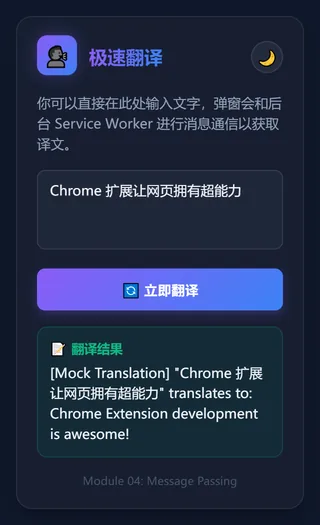
▲ Popup 与 Service Worker 消息往返后渲染出的译文(真实消息通信结果)
本文讲解原理与关键片段;完整 HTML/CSS/JS 及逐步操作见仓库 04-message-passing 目录内的 README。
本课目标
- 使用
chrome.runtime.sendMessage/onMessage - 声明式注入
content_scripts(http/https 自动加载) - 网页划词 → 悬浮卡片 → 后台翻译 → 回显
- Popup 手动输入走同一后台 handler
为什么需要消息
Popup、Content Script、Service Worker 三个隔离世界,不能直接共享变量。数据交换靠:
| API | 方向 |
|---|---|
chrome.runtime.sendMessage | 任意上下文 → 扩展内部(通常到 SW) |
chrome.tabs.sendMessage | 扩展 → 指定 tab 的 Content Script |
chrome.runtime.onMessage | 监听入站消息 |
manifest.json
{
  "manifest_version": 3,
  "name": "划词翻译助手",
  "version": "1.0.0",
  "background": {
    "service_worker": "background.js"
  },
  "content_scripts": [
    {
      "matches": ["http://*/*", "https://*/*"],
      "js": ["content.js"]
    }
  ],
  "action": {
    "default_popup": "popup.html"
  }
}
本 Demo 零 permissions——声明式 content_scripts + background 即可。
消息流(Mermaid)
图表加载中…
background.js:异步必须 return true
chrome.runtime.onMessage.addListener((request, _sender, sendResponse) => {
  if (request.action === 'translate') {
    setTimeout(() => {
      sendResponse({
        success: true,
        translation: mockTranslate(request.text),
      });
    }, 500);
    return true; // 保持通道,等待异步 sendResponse
  }
});
不写 return true 会报错:The message port closed before a response was received。
content.js:划词 + 悬浮窗
document.addEventListener('mouseup', () => {
  const selectedText = window.getSelection().toString().trim();
  if (!selectedText) return removeTooltip();
  // 创建 position:absolute 悬浮 div,z-index: 2147483647
  chrome.runtime.sendMessage(
    { action: 'translate', text: selectedText },
    (response) => {
      if (chrome.runtime.lastError) { /* … */ return; }
      updateResult(response.translation);
    },
  );
});悬浮层用内联样式 + !important,降低被宿主 CSS 覆盖的概率。
popup.js
chrome.runtime.sendMessage({ action: 'translate', text }, (response) => {
  translatedTextEl.textContent = response?.translation ?? '失败';
});
获取源码
git clone https://github.com/davidapp/chrome-extension-demos.git
cd chrome-extension-demos/04-message-passing
也可 Download ZIP 解压后进入 04-message-passing 目录。
体验步骤
- 打开
chrome://extensions→ 开发者模式 → 加载已解压的扩展程序 → 选择04-message-passing目录 - 刷新已打开网页(让 content.js 注入)
- 网页选中英文 → 悬浮译文
- Popup 输入文字 → 点击翻译
调试:网页 Console 看 content 日志;chrome://extensions 看 SW 日志。
课后练习
background.js用fetch接真实翻译 API(见 网络与 CORS)- Popup 按钮
chrome.tabs.sendMessage改网页背景色
延伸阅读
- 完整源码:
04-message-passing— 可运行项目与 README 逐步说明 - 消息传递
- Content Scripts
小结
扩展各上下文靠消息协作;异步 sendResponse 必须 return true。下一课系统学习 chrome.storage。
→ 下一课:第 5 课:Storage API