第 5 课:Storage API
Chrome 插件开发指南 · 实战课程 · chrome.storage.local 与 onChanged 联动 Badge
作者 David更新于
本课配套开源 Demo 05-storage-api:「待办事务清单」——在 Popup 做 Todo CRUD,后台监听 chrome.storage.onChanged 自动更新角标。
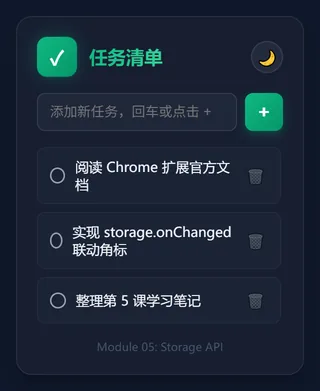
▲ 基于 chrome.storage 的待办清单,数据持久保存、刷新不丢
本文讲解原理与关键片段;完整 HTML/CSS/JS 及逐步操作见仓库 05-storage-api 目录内的 README。
本课目标
- 理解为何不用
localStorage(SW 不可用、多进程冲突) - 使用
chrome.storage.local存对象数组 onChanged实现 Popup ↔ Background 状态同步- Todo 渲染时
escapeHtml防 XSS
为什么不用 localStorage
| 问题 | 说明 |
|---|---|
| Service Worker | 同步 API,Worker 中禁用 |
| 多上下文 | Popup / CS / SW 不同进程,竞态严重 |
| 类型 | 只能存字符串,需手动 JSON |
chrome.storage:异步、全上下文、直接存对象、可选 sync 云同步。
存储区域
| 区域 | 容量 | 用途 |
|---|---|---|
local | 约 10 MB | Todo、缓存、大列表 |
sync | 约 100 KB | 用户配置(第 6 课) |
session | 内存 | 浏览器关闭即失效 |
manifest.json
{
  "manifest_version": 3,
  "name": "待办事务清单",
  "permissions": ["storage"],
  "background": { "service_worker": "background.js" },
  "action": { "default_popup": "popup.html" }
}
数据流
Popup chrome.storage.local.set({ todos })
        ↓
chrome.storage.onChanged(系统总线)
        ↓
background.js → 统计未完成数 → setBadgeText
popup.js:CRUD 片段
const newTodo = { id: Date.now(), text, completed: false };
todos.push(newTodo);
await chrome.storage.local.set({ todos });
// 渲染时用 escapeHtml 防 XSS
function escapeHtml(s) {
return s.replace(/[&<>"']/g, (m) => ({ '&':'&','<':'<' }[m]));
}background.js:onChanged
chrome.storage.onChanged.addListener(async (changes, areaName) => {
  if (areaName === 'local' && changes.todos) {
    await updateBadge(changes.todos.newValue);
  }
});

async function updateBadge(todosList) {
  const list = todosList ?? (await chrome.storage.local.get('todos')).todos ?? [];
  const pending = list.filter((t) => !t.completed).length;
  await chrome.action.setBadgeText({ text: pending > 0 ? String(pending) : '' });
}
获取源码
git clone https://github.com/davidapp/chrome-extension-demos.git
cd chrome-extension-demos/05-storage-api
也可 Download ZIP 解压后进入 05-storage-api 目录。
体验
- 打开
chrome://extensions→ 开发者模式 → 加载已解压的扩展程序 → 选择05-storage-api目录 - 点击扩展图标,添加/完成/删除 Todo → 角标数字实时变化
- 关闭浏览器再开,数据仍在
local
课后练习
- 读写改为
chrome.storage.sync,多设备同步测试 - 底部 Tab:全部 / 待办 / 已完成
延伸阅读
- 完整源码:
05-storage-api— 可运行项目与 README 逐步说明 - 存储 API
- Service Worker
小结
业务状态进 chrome.storage;onChanged 让后台无需 Popup 主动通知。下一课用 Options Page + sync 做用户配置。
→ 下一课:第 6 课:Options Page